
Install and first run
Mercy SF is a desktop application that plays the repetitive parts of Shakes & Fidget for you: quests, arena, dungeons, fortress, underworld, pets, guild and the timed events, for one account or twenty at once.
There is no account to create, no licence key, and no trial. This takes about a minute.
1. Download
Go to mercysf.app/downloads and take the installer for your platform.
| Platform | File |
|---|---|
| Windows | Setup.exe or .msi, 64-bit |
| macOS | .dmg, Apple Silicon or Intel |
| Linux | .AppImage, .deb or .rpm |
| Console | A headless build for servers and scripts, on all three |
The console build has an interactive menu and a non-interactive mode for driving it from a dashboard or a script.
First launch warnings
On Windows, SmartScreen may warn about a new publisher for the first few days after a release. Choose More info, then Run anyway.
On macOS, right-click the app and choose Open the first time, so the system accepts it.
You do not need an account to download. There is a free account on mercysf.app for Discord linking, voting on the roadmap and the referral programme, and it changes nothing about the bot.
2. Sign in with your Shakes & Fidget account
Launch the app and enter your Shakes & Fidget credentials.
Mercy SF talks to the game's own servers directly. It does not modify the game client, your credentials are stored locally and encrypted, and there is no account server holding them.
One sign-in covers every character on that account, across every server. You do not sign in per character.
Several accounts
Saved accounts appear on the sign-in screen. Log in all signs into every one of them in a single pass, shows progress as it works through the list, and names any that fail rather than only counting them. The tick box beside it does the same automatically next time you start the app.
3. Choose what it may do
Open Settings and switch on the modules you want. Every toggle applies immediately, with no restart.
The groups are:
- The daily loop: quests and tavern, dungeons, tower and fortress, underworld, pets.
- Fighting: arena, scrapbook hunting.
- The timed events: World Boss, Hellevator, Legendary Dungeon.
- Guild.
- Economy: beer, gold, the blacksmith, inventory and shops.
The mushroom settings
Everything that can spend mushrooms is off by default, because mushrooms are real money. If you want the bot to spend them, you have to say so, per feature. The reserve and the daily budget are on the settings page.
If you are not sure where to start, leave the defaults alone. They are chosen to be the sensible way to play, not the maximum.
4. Start it
Press Start Bot in the sidebar. The overview screen shows what every character is doing right now, its cooldowns and its current task.
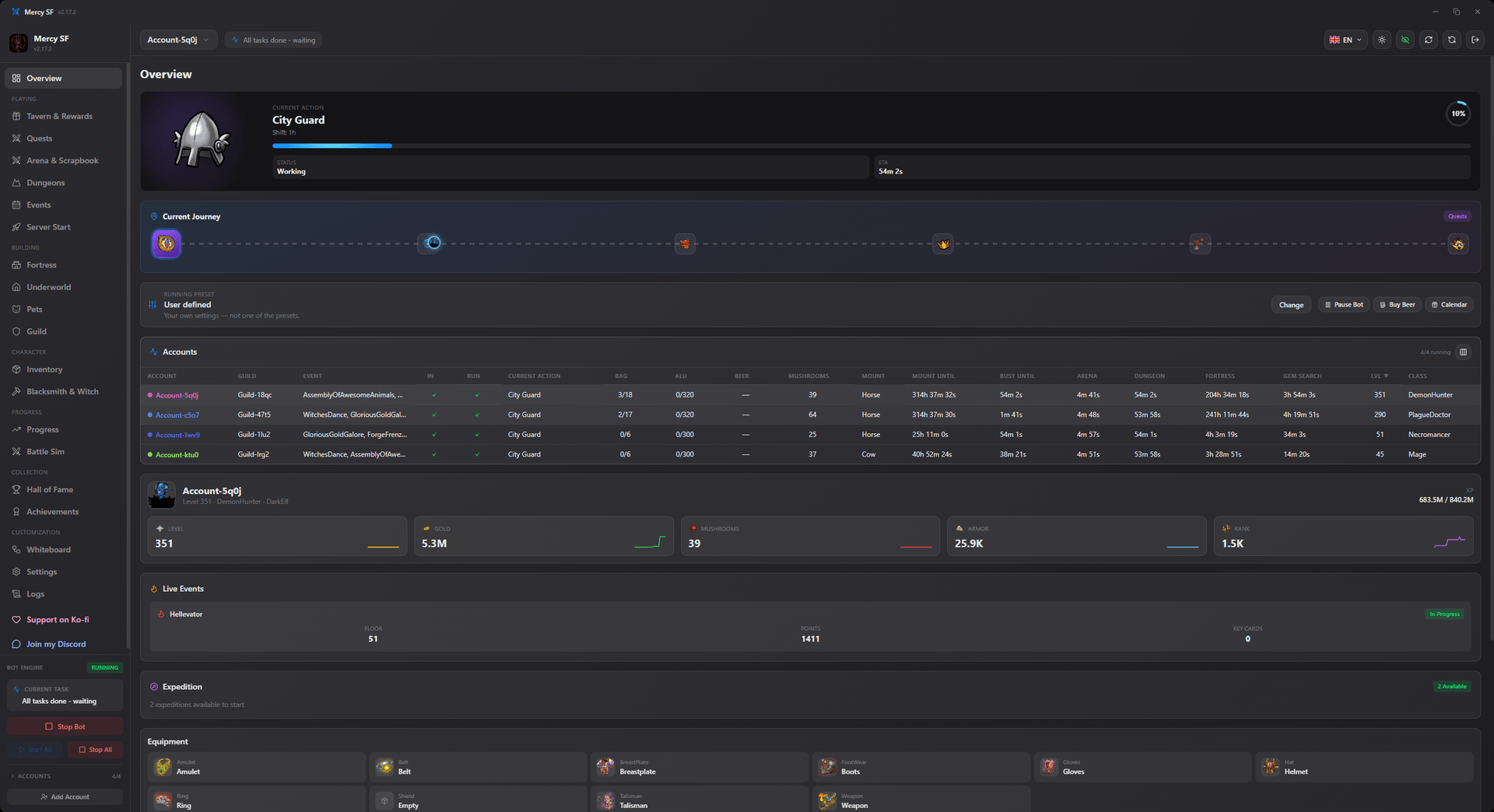
Minimise it to the system tray and it keeps working.
Does the app have to stay open?
Yes. The bot runs while the app runs. Minimising to the tray is fine.
If you want it running without a desktop at all, use the headless build on a server. See the CLI reference.
Next
- The overview screen, to read what you are looking at
- How to automate the game, for a guided pass through the settings
- Troubleshooting and the FAQ if something is off